


كيفية استخدام Flutter Spectrum لإنشاء تطبيقات متعددة الألوان وجذابة
يُعد تحسين تجربة المستخدم في تطبيقات الجوال عنصرًا أساسيًا لنجاح أي تطبيق. ومن أهم العوامل التي تؤثر في تجربة المستخدم هو نظام الألوان والتصميم البصري. هنا يأتي دور مكتبة Flutter Spectrum التي تساعد المطورين على إنشاء تطبيقات متعددة الألوان بسهولة واحترافية داخل بيئة Flutter.
ما هي مكتبة Flutter Spectrum؟
مميزات Flutter Spectrum
تطوير تطبيقات Android باستخدام Flutter Spectrum
إضافة ملف utilities.dart داخل المشروع
class DashedLinePainter extends CustomPainter {
  final Color color;
  final bool isVertical;

  DashedLinePainter({this.color = Colors.blueGrey, this.isVertical = true});

  @override
  void paint(Canvas canvas, Size size) {
    double dashWidth = 9, dashSpace = 5, startX = 0;
    final paint = Paint()
      ..color = color
      ..strokeWidth = 1;

    if (isVertical) {
      while (startX < size.height) {
        canvas.drawLine(
            Offset(0, startX), Offset(0, startX + dashWidth), paint);
        startX += dashWidth + dashSpace;
      }
    } else {
      while (startX < size.width) {
        canvas.drawLine(
            Offset(startX, 0), Offset(startX + dashWidth, 0), paint);
        startX += dashWidth + dashSpace;
      }
    }
  }

  @override
  bool shouldRepaint(CustomPainter oldDelegate) => false;
}
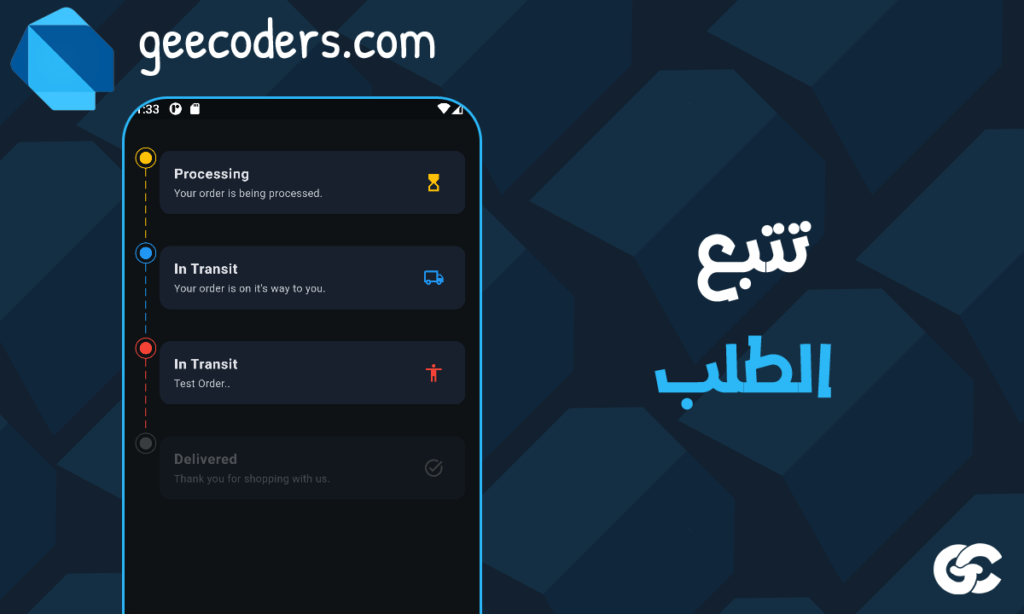
تصميم قائمة Order Tracking باستخدام Flutter Spectrum
class OrderStatusItemView extends StatelessWidget {
  const OrderStatusItemView({
    Key? key,
    required this.color,
    required this.title,
    required this.subtitle,
    required this.icon,
    required this.showLine,
    required this.isActive})
    : super(key: key);

  final Color color;
  final String title;
  final String subtitle;
  final IconData icon;
  final bool showLine;
  final bool isActive;

  @override
  Widget build(BuildContext context) {
    final themeColors = Theme.of(context).colorScheme;

    return Opacity(
      opacity: isActive ? 1 : 0.3,
      child: Row(
        crossAxisAlignment: CrossAxisAlignment.start,
        children: [
          SizedBox(
            height: 100,
            child: Column(
              children: [
                Container(
                  width: 24,
                  height: 24,
                  decoration: BoxDecoration(
                    shape: BoxShape.circle,
                    border: Border.all(
                      color: isActive ? color : Colors.grey,
                    ),
                  ),
                  child: Container(
                    margin: const EdgeInsets.all(4),
                    decoration: BoxDecoration(
                      shape: BoxShape.circle,
                      color: isActive ? color : Colors.grey,
                    ),
                  ),
                ),
                if (showLine)
                  Expanded(
                    child: CustomPaint(
                      painter: DashedLinePainter(
                        color: isActive ? color : Colors.grey,
                      ),
                    ),
                  ),
              ],
            ),
          ),
          Expanded(
            child: Card(
              color: themeColors.surface,
              child: ListTile(
                title: Text(title,
                    style: const TextStyle(fontWeight: FontWeight.bold)),
                subtitle: Text(subtitle),
                trailing: Icon(
                  icon,
                  color: isActive ? color : Colors.grey,
                ),
              ),
            ),
          ),
        ],
      ),
    );
  }
}
استخدام Flutter Spectrum داخل الكود الأساسي
class Enums extends StatefulWidget {
  const Enums({Key? key}) : super(key: key);

  @override
  State<Enums> createState() => _EnumsState();
}

class _EnumsState extends State<Enums> {
  @override
  Widget build(BuildContext context) {
    final themeColors = Theme.of(context).colorScheme;

    return Scaffold(
      backgroundColor: themeColors.background,
      appBar: AppBar(
        title: const Text('Order Tracking'),
      ),
      body: ListView(
        padding: const EdgeInsets.all(16),
        children: const [
          OrderStatusItemView(
            color: Colors.amber,
            title: 'Processing',
            subtitle: 'Your order is being processed.',
            icon: Icons.hourglass_top_outlined,
            showLine: true,
            isActive: true,
          ),
          OrderStatusItemView(
            color: Colors.blue,
            title: 'In Transit',
            subtitle: 'Your order is on its way.',
            icon: Icons.local_shipping_outlined,
            showLine: true,
            isActive: true,
          ),
          OrderStatusItemView(
            color: Colors.green,
            title: 'Delivered',
            subtitle: 'Thank you for shopping with us.',
            icon: Icons.task_alt_outlined,
            showLine: false,
            isActive: false,
          ),
        ],
      ),
    );
  }
}
خطوات تعلم واستخدام Flutter Spectrum باحتراف
أهمية استخدام Flutter Spectrum في تحسين تجربة المستخدم
الخلاصة
اذا كنت مهتم بالتصاميم في فلاتر يمكنك الاطلاع علي المقاله التاليه : تصميم صفحة لاضافة الاشخاص داخل تطبيقك في فلاتر | Designing a page to add people within an application in Flutter
رابط المقال