

تصميم صفحة لاضافة الاشخاص داخل تطبيقك في فلاتر | Designing a page to add people within an application in Flutter
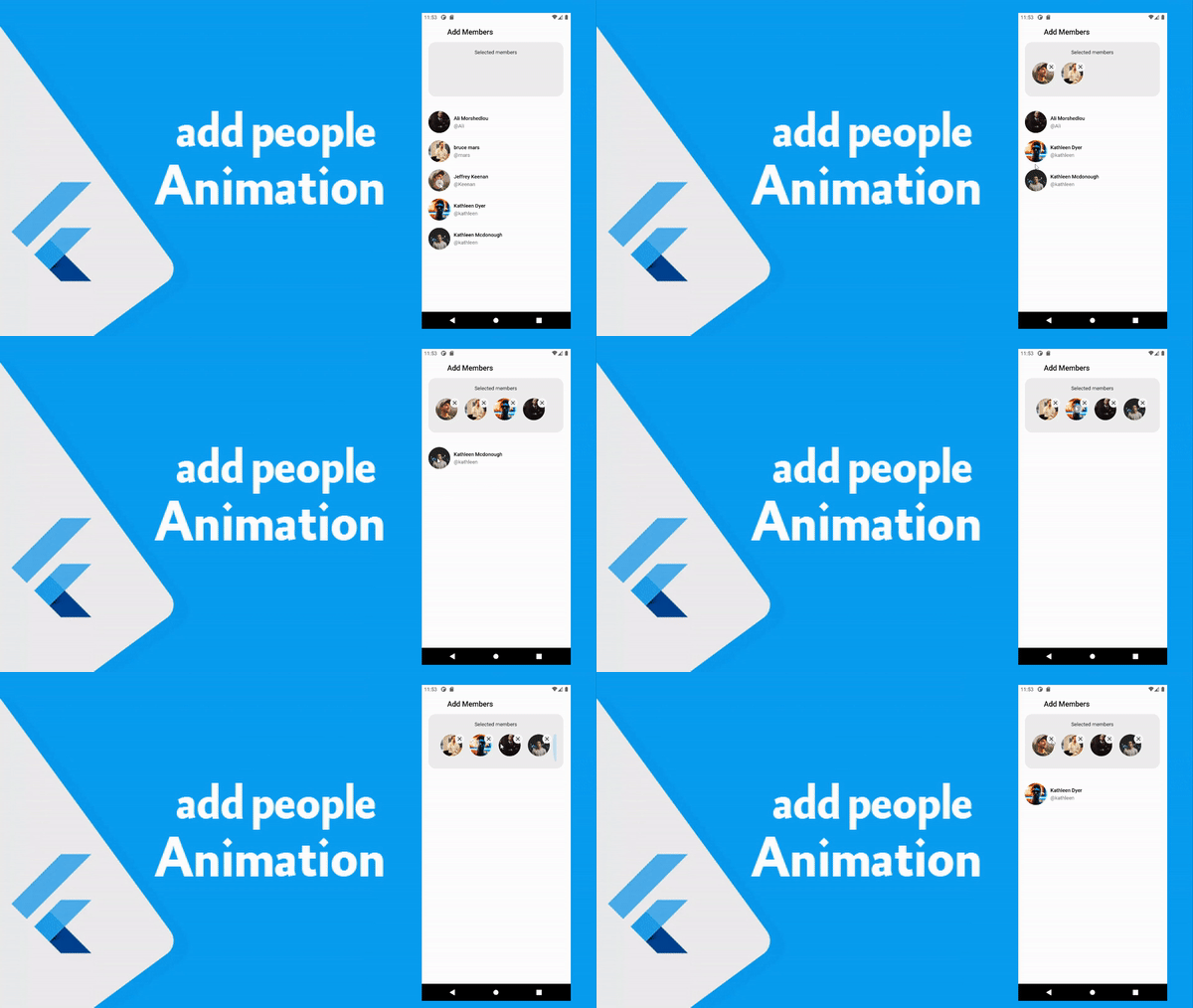
في هذا الدرس من دروس تحسين تطبيقات الجوال سوف نشرح معكم كيف تقوم بعمل صفحة لاضافة الاشخاص داخل مجموعه او اضافة مجموعة من العناصر داخل box كما هو موضح بالصورة مع انميشن لطيف خلال عملية الاضافة او الحذف بكل سهوله وهذا التصميم رائع جدا ويساعد كل مهتم بمجال تطوير تطبيقات الجوال ونحن نحاول معكم دائما مشاركة معكم كل ما هو جديد وحصري في عالم البرمجة وخصوصا برمجة تطبيقات الجوال بمختلف انواعها .
design page to add people in your app
في هذه الصفحة يتم تنفيذ الانميشن وكل محتويات التصميم بشكل كامل حيث يوجد هنا ايضا ال model الذي يحتوي على البيانات والانميشن الذي سوف نستخدمه يمكنك نسخ الاكواد كامله من هذه الصفحة واستعاملها لديك وايضا تستطيع التعديل عليها وعلى الالوان حتى تتلائم مع التصميم الذي تعمل عليه او اقتباس الافكار التي ترغب بها من هذا التصميم لديك اذا كنت ترغب بذالك .

ui.dart
import 'package:flutter/material.dart';

class User {
  final String name;
  final String username;
  final String image;
  bool isFollowedByMe;

  User(this.name, this.username, this.image, this.isFollowedByMe);
}

class MembersPage extends StatefulWidget {
  const MembersPage({ Key? key }) : super(key: key);

  @override
  _MembersPageState createState() => _MembersPageState();
}

class _MembersPageState extends State<MembersPage> with TickerProviderStateMixin {

  List<User> _users = [
    User('Ali Morshedlou', '@Ali', 'https://images.unsplash.com/photo-1519085360753-af0119f7cbe7?ixlib=rb-4.0.3&ixid=MnwxMjA3fDB8MHxwaG90by1wYWdlfHx8fGVufDB8fHx8&auto=format&fit=crop&w=687&q=80', false),
    User('Jeffrey Keenan', '@Keenan', 'https://images.unsplash.com/photo-1600486913747-55e5470d6f40?ixlib=rb-4.0.3&ixid=MnwxMjA3fDB8MHxwaG90by1wYWdlfHx8fGVufDB8fHx8&auto=format&fit=crop&w=1170&q=80', false),
    User('Kathleen Mcdonough', '@kathleen', 'https://images.unsplash.com/photo-1507081323647-4d250478b919?ixlib=rb-0.3.5&q=80&fm=jpg&crop=faces&fit=crop&h=200&w=200&s=b717a6d0469694bbe6400e6bfe45a1da', false),
    User('Kathleen Dyer', '@kathleen', 'https://images.unsplash.com/photo-1502980426475-b83966705988?ixlib=rb-0.3.5&q=80&fm=jpg&crop=faces&fit=crop&h=200&w=200&s=ddcb7ec744fc63472f2d9e19362aa387', false),
    User('bruce mars', '@mars', 'https://images.unsplash.com/photo-1537511446984-935f663eb1f4?ixlib=rb-4.0.3&ixid=MnwxMjA3fDB8MHxwaG90by1wYWdlfHx8fGVufDB8fHx8&auto=format&fit=crop&w=1170&q=80', false)
  ];

  List<User> _selectedUsers = [];

  final GlobalKey<AnimatedListState> listKey = GlobalKey<AnimatedListState>();
  final GlobalKey<AnimatedListState> selectedListKey = GlobalKey<AnimatedListState>();

  @override
  Widget build(BuildContext context) {
    return Scaffold(
      appBar: AppBar(
        elevation: 0,
        backgroundColor: Colors.white,
        title: Text('Add Members', style: TextStyle(color: Colors.black),),
      ),
      body: Container(
          padding: EdgeInsets.only(right: 20, left: 20),
          color: Colors.white,
          height: double.infinity,
          width: double.infinity,
          child: Column(
            children: [
              Container(
                height: 150,
                width: double.infinity,
                padding: EdgeInsets.all(20),
                decoration: BoxDecoration(
                    color: Colors.grey[200],
                    borderRadius: BorderRadius.circular(20)
                ),
                child: Column(
                  children: [
                    Text("Selected members"),
                    SizedBox(height: 20),
                    Expanded(
                      child: AnimatedList(
                          scrollDirection: Axis.horizontal,
                          key: selectedListKey,
                          initialItemCount: _selectedUsers.length,
                          itemBuilder: (context, index, animation) {
                            return selectedUsersComponent(user: _selectedUsers[index], index: index, animation: animation);
                          }
                      ),
                    )
                  ],
                ),
              ),
              SizedBox(height: 30),
              Expanded(
                child: AnimatedList(
                    key: listKey,
                    initialItemCount: _users.length,
                    itemBuilder: (context, index, animation) {
                      return userComponent(user: _users[index], index: index, animation: animation);
                    }
                ),
              ),
            ],
          )
      ),
    );
  }

  selectedUsersComponent({required User user, index, animation}) {
    return FadeTransition(
      opacity: animation,
      child: Container(
        child: Stack(
          children: [
            Container(
                margin: EdgeInsets.only(right: 20),
                width: 60,
                height: 60,
                child: ClipRRect(
                  borderRadius: BorderRadius.circular(50),
                  child: Image.network(user.image,fit: BoxFit.cover,),
                )
            ),

            Positioned(
              top: 0,
              right: 15,
              child: GestureDetector(
                onTap: () {
                  listKey.currentState?.insertItem(_users.length, duration: Duration(milliseconds: 500));
                  selectedListKey.currentState?.removeItem(
                      index,
                          (context, animation) => selectedUsersComponent(user: user, index: index, animation: animation),
                      duration: Duration(milliseconds: 300));

                  _selectedUsers.remove(user);
                  _users.add(user);
                },
                child: Container(
                  width: 25,
                  height: 25,
                  decoration: BoxDecoration(
                      border: Border.all(color: Colors.white, width: 3),
                      shape: BoxShape.circle,
                      color: Colors.grey[200]
                  ),
                  child: Center(
                      child: Icon(Icons.close, size: 18,)
                  ),
                ),
              ),
            )
          ],
        ),
      ),
    );
  }

  userComponent({required User user, index, animation}) {
    return GestureDetector(
      onTap: () => {
        setState(() {
          if (_selectedUsers.length > 4)
            return;

          listKey.currentState?.removeItem(
              index,
                  (context, animation) => userComponent(user: user, index: index, animation: animation),
              duration: Duration(milliseconds: 300));

          selectedListKey.currentState?.insertItem(_selectedUsers.length, duration: Duration(milliseconds: 500));

          _selectedUsers.add(user);
          _users.remove(user);
        })
      },
      child: FadeTransition(
        opacity: animation,
        child: Container(
          padding: EdgeInsets.only(top: 10, bottom: 10),
          child: Row(
            mainAxisAlignment: MainAxisAlignment.spaceBetween,
            children: [
              Row(
                  children: [
                    Container(
                        width: 60,
                        height: 60,
                        child: ClipRRect(
                          borderRadius: BorderRadius.circular(50),
                          child: Image.network(user.image,fit: BoxFit.cover,),
                        )
                    ),
                    SizedBox(width: 10),
                    Column(
                        crossAxisAlignment: CrossAxisAlignment.start,
                        children: [
                          Text(user.name, style: TextStyle(color: Colors.black, fontWeight: FontWeight.w500)),
                          SizedBox(height: 5,),
                          Text(user.username, style: TextStyle(color: Colors.grey[600])),
                        ]
                    )
                  ]
              )
            ],
          ),
        ),
      ),
    );
  }
}