

شرح كيفية الانتقال الى حساباتك في مواقع التواصل الاجتماعي من فلاتر
اذا كنت تعمل على تطبيق وطلب منك العميل اضافة مواقع التواصل الاجتماعي للتطبيق سوف يخطر في بالك عمل webview وارسال المستخدم الى الموقع الخاص بالمستخدم او ارساله الى رابط الصفحة على مختلف وسائل التواصل ولكن هذا الامر ليس صحيح في الطبيعي ان تقوم بإرسال المستخدم الى تطبيق وليس موقع ولهذا نقدم لك مقالة اليوم حيث نقوم فيها بمشاركة طريقة ارسال المستخدم الى مواقع التواصل الاجتماعي الى التطبيقات واذا لم يتوفر التطبيق على جهاز المستخدم سوف يتم ارساله الى الموقع الخاص بالصفحة التي يتم ارفاقها .
add package url_launcher
dependencies:
url_launcher: ^6.1.2
How to Navigate to different apps
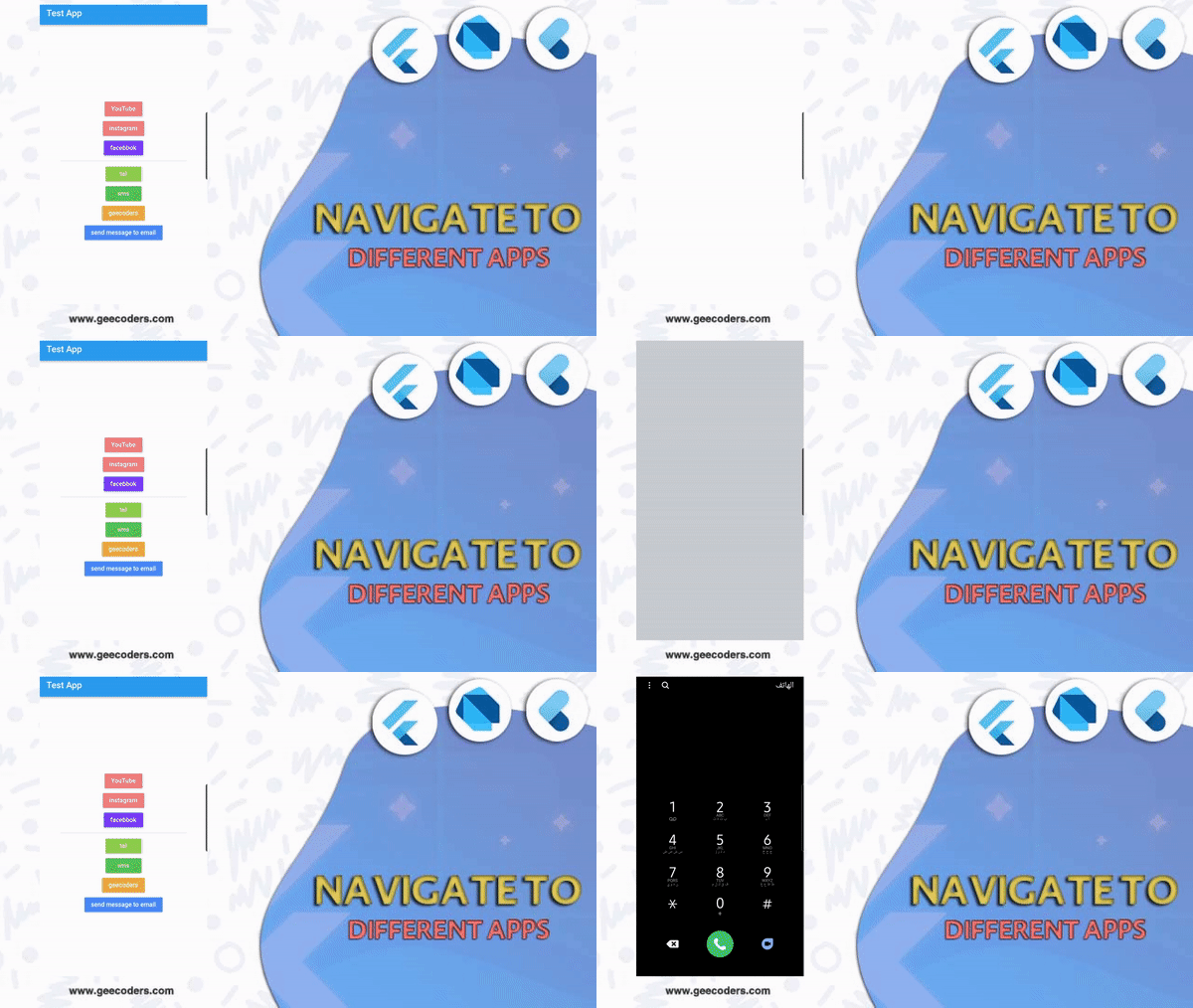
سوف نقوم بعمل مجموعة من الازرار كل زر يقوم بوظيفة معينه مثل ارسال المستخدم الى يوتيوب والى انستقرام ولى حسابة في الفيسبوك وايضا يمكنك ارفاق رقم يتم من خلاله ارسال المستخدم الى قائمة الاتصال لكي يتصل بخدمة العملاء على سبيل المثال ويمكنك ارسال رسالة معينه نصية الى رقم معين ويمكنك عرض موقع واخيرا يمكنك ارسال بريد اليكتروني كما هو موضح بالمثال السابق كل هذا يمكنك القيام به من خلال الكود التالي تستطيع نسخه ووضعه لديك في التصميم واستمتع بالتجربة .

GG.dart
class GG extends StatelessWidget {
  const GG({Key? key}) : super(key: key);

  @override
  Widget build(BuildContext context) {

    return Scaffold(
      backgroundColor: Colors.white,
      appBar: AppBar(
        title: const Text('Test App'),
      ),
      body: Center(
        child: Column(
          mainAxisAlignment: MainAxisAlignment.center,
          crossAxisAlignment: CrossAxisAlignment.center,
          children: [

            MaterialButton(
              color: Colors.redAccent[100],
              onPressed: () async {
                const url4 = "https://www.youtube.com";
                _launchURL(url: url4);
              },

              child: const Text('YouTube',
              style: TextStyle(color: Colors.white),),
            ),

            MaterialButton(
              color: Colors.redAccent[100],
              onPressed: () async {
                var url = 'https://www.instagram.com/geecoders--/';

                if (await canLaunch(url)) {
                  await launch(
                    url,
                    universalLinksOnly: true,
                  );
                } else {
                  throw 'There was a problem to open the url: $url';
                }

              },

              child: const Text('instagram',
              style: TextStyle(color: Colors.white),),
            ),

            MaterialButton(
              color: Colors.deepPurpleAccent,
              onPressed: () async {
                launchFacebook(id: '1046386452185966');
              },

              child: const Text('facebbok',
                style: TextStyle(color: Colors.white),),
            ),
            const Padding(
              padding: EdgeInsets.symmetric(horizontal: 50),
              child: Divider(thickness: 1,),
            ),

            MaterialButton(
              color: Colors.lightGreen,
              onPressed: () async {
                final phone = "+0020100003000";
                final lanTel = 'tel:$phone';

                // intent to phone .
                if (await canLaunch(lanTel)){
                  await launch(lanTel);
                }

              },

              child: const Text('tel',
                style: TextStyle(color: Colors.white),),
            ),

            MaterialButton(
              color: Colors.green,
              onPressed: () async {
                final phone = "0020100003000";
                final lanTel = 'sms:$phone';

                // intent to sms message .
                if (await canLaunch(lanTel)){
                  await launch(lanTel);
                }

              },

              child: const Text('sms',
                style: TextStyle(color: Colors.white),),
            ),

            MaterialButton(
              color: Colors.orangeAccent,
              onPressed: ()  async {
                const url6 = "https://www.geecoders.com";
                await openBrowser(url: url6 , inApp: true);
                // _launchURL(url: url5);
              },

              child: const Text('geecoders',
                style: TextStyle(color: Colors.white),),
            ),

            MaterialButton(
              color: Colors.blueAccent,
              onPressed: () async {
                final toEmail = 'ahmed@gmail.com';
                final subject = 'test message Title';
                final message = 'Hello ahmed how are you ?';
                final urlEmail = 'mailto:$toEmail?subject=${Uri.encodeFull(subject)}&body=${Uri.encodeFull(message)}';

                if (await canLaunch(urlEmail)){
                  await launch(urlEmail);
                }

              },

              child: const Text('send message to email',
                style: TextStyle(color: Colors.white),),
            ),
          ],
        ),
      ),
    );
  }

  Future<void> openBrowser({
  required String url,
    bool inApp = false,
}) async {
    if (await canLaunch(url)) {
     await launch(
       url,
       forceSafariVC: inApp,
       forceWebView: inApp,
       enableJavaScript: true,
     );
    }
  }

  void _launchURL({
  required String url
}) async {
    if (!await launch(url)) throw 'Could not launch $_launchURL';
  }

  void launchUrl2() async{
    var url = 'fb://facewebmodal/f?href=https://www.facebook.com/al.mamun.me12';
    if (await canLaunch(url)) {
      await launch( url, universalLinksOnly: true, );
    } else { throw 'There was a problem to open the url: $url'; }

  }

  void launchFacebook({required String id}) async {
    String fbProtocolUrl;
    if (Platform.isIOS) {
      fbProtocolUrl = 'fb://profile/$id';
    } else {
      fbProtocolUrl = 'fb://page/$id';
    }

    String fallbackUrl = 'https://www.facebook.com';

    try {
      bool launched = await launch(fbProtocolUrl, forceSafariVC: false);

      if (!launched) {
        await launch(fallbackUrl, forceSafariVC: false);
      }
    } catch (e) {
      await launch(fallbackUrl, forceSafariVC: false);
    }
  }

}
فيديو الشرح
لمزيد من الشروحات :
- شرح تمرير البيانات في Flutter اثناء الانتقال بين الصفحات
- تغيير علامة التحميل في فلاتر الى مجموعه من الاشكال الرائعه
- حل مشكلة No application found for TargetPlatform.android_x86.
- التعامل مع التصميم في حالة portrait و landscape باستخدام mediaQuery في Flutter
- كيفية ضبط ابعاد التصميم للعمل بشكل افقي وعمودي بدون مشاكل في فلاتر باستخدام
تطبيق url_launcher للتواصل الاجتماعي في مشروعك
استخدم Uri موثوقًا وHTTPS كمسار احتياطي، وتعامل مع false أو الاستثناء؛ لا تفترض أن تطبيق منصة التواصل مثبت لدى جميع المستخدمين.
عند مراجعة صفحة url_launcher كان الإصدار المنشور 6.3.3. أرقام الإصدارات في المثال الأصلي قد تختلف؛ قارِن دليل الهجرة وإعدادات المنصة قبل التحديث، ولا ترفع قيد الاعتماد وحده مع إبقاء استدعاءات واجهة قديمة.
مراجع الموضوع: pub.dev — url_launcher