


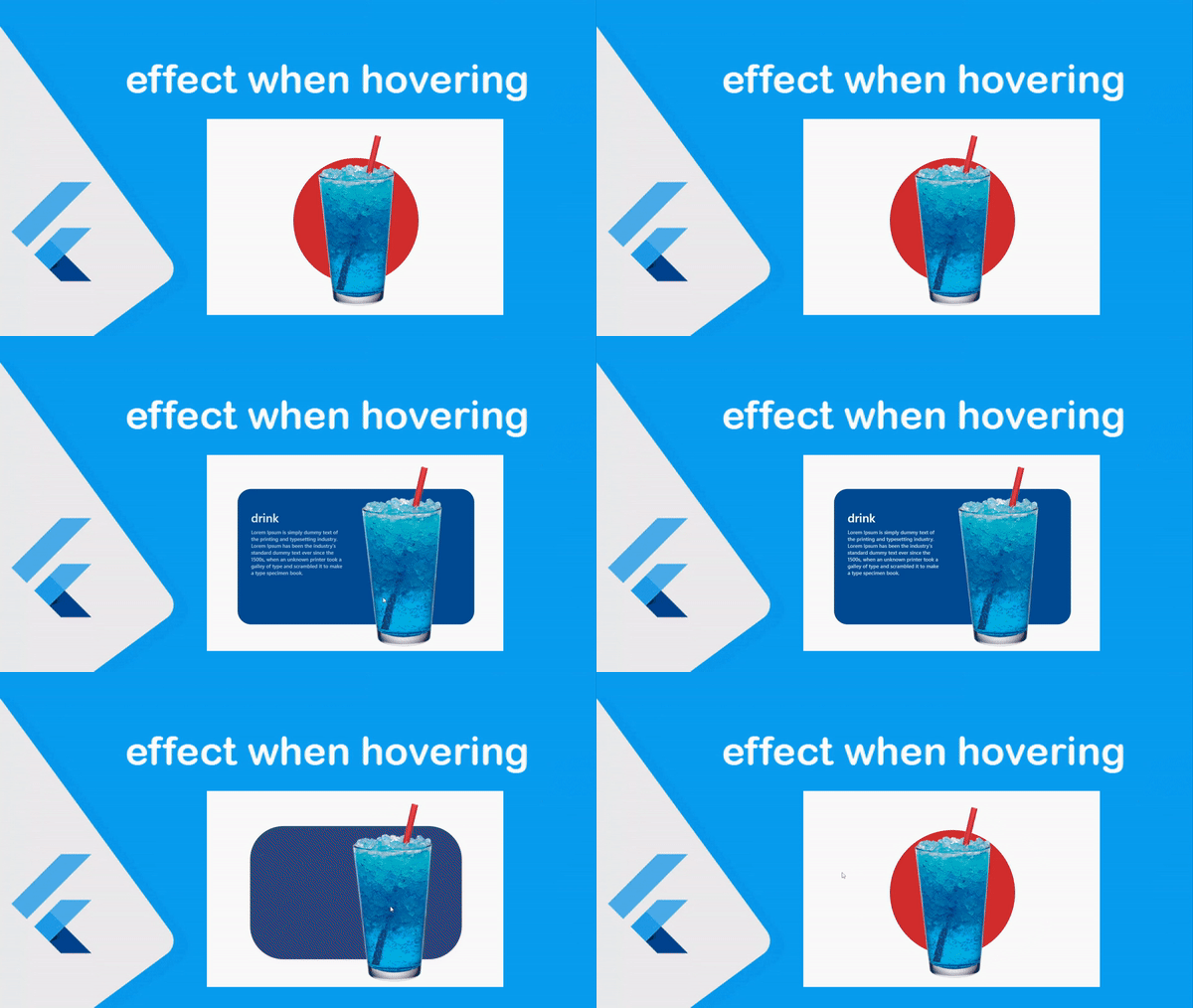
تاثير على الصور عند تمرير الماوس عليها في صفحات الويب بالفلاتر
اذا كنت ترغب بعمل انميشن على الصور من خلال وضع الماوس على الصورة وتحريك الصورة او تغير العناصر الخاصه بها في تطبيقات الويب بفلاتر فالامر بسيط وسوف نشرح لكم في هذا المقال كيف تتم العمليه بشكل بسيط جدا وكل هذا من خلال الاكواد التي نقدمها لكم في هذه المقاله البسيطة لكم من اجل تحسين موقع الويب الخاص بكم في الذي يتم تطويره باستخدام تقنية Flutter الغنية عن التعرف والامر بسيط جدا , وفي هذا القسم تحديدا نقدم لكم كل ما هو جديد في عالم الويب باستخدام flutter من اجل بناء تطبيقات قوية وناجحه لديكم .
Add an effect when hovering the mouse over the elements
التاثير بكل بساطة يشير الى ان نتتبع حركة الماوس واذا صادف الماوس الموقع الخاص بالعنصر فسوف يكون تعير العنصر واظهار التفاصيل الخاصه به او حتى تغيير اللون يمكنك تنفيذ اي امر ترغب به كما تريد دون اي مشاكل والامر بسيط وكل شيئ واضح من خلال الاكواد التاليه كل شيئ مترتب على MouseRegion وهيا لتتبع اذا صادف حركة الماوس العنصر او لا وماذا يحدث اذا اختفى الماوس من على العنصر وكل شيئ واضح في الاكواد الموجوده في الاسفل .

mouse.dart
class MyMobileBody extends StatefulWidget {
  const MyMobileBody({Key? key}) : super(key: key);

  @override
  State<MyMobileBody> createState() => _MyMobileBodyState();
}

class _MyMobileBodyState extends State<MyMobileBody> {
  BorderRadius? border;
  Color? color;
  double? height;
  double? width;
  bool? animate;
  bool? textAppear;

  @override
  void initState() {
    super.initState();
    animate = false;
    textAppear = false;
    changer(animate!);
  }

  void changer(bool a) {
    setState(() {
      if (a) {
        height = 400;
        width = 700;
        color = Color(0xff004b93);
        border = BorderRadius.circular(40.0);
        Future.delayed(Duration(milliseconds: 300), () {
          setState(() {
            textAppear = true;
          });
        });
      } else {
        height = 370;
        width = 370;
        color = Colors.red[700];
        border = BorderRadius.circular(300.0);
      }
    });
  }

  @override
  Widget build(BuildContext context) {
    return Scaffold(
      body: Center(
        child: MouseRegion(
          onEnter: (a) {
            setState(() {
              animate = true;
              changer(animate!);
            });
          },
          onExit: (a) {
            setState(() {
              animate = false;
              changer(animate!);
              textAppear = false;
            });
          },
          child: Container(
            height: 650,
            width: 700,
            child: Stack(
              children: [
                Align(
                  alignment: Alignment(0, 0),
                  child: AnimatedContainer(
                    height: height!,
                    width: width!,
                    duration: Duration(milliseconds: 275),
                    padding:
                    EdgeInsets.symmetric(horizontal: 40.0, vertical: 60.0),
                    decoration: BoxDecoration(
                      borderRadius: border!,
                      color: color!,
                    ),
                    child: AnimatedOpacity(
                      opacity: textAppear! ? 1 : 0,
                      duration: Duration(milliseconds: textAppear! ? 400 : 100),
                      curve: Curves.easeOut,
                      child: Column(
                        crossAxisAlignment: CrossAxisAlignment.start,
                        mainAxisAlignment: MainAxisAlignment.start,
                        children: [
                          Text(
                            "drink",
                            style: TextStyle(
                              fontSize: 35.0,
                              fontWeight: FontWeight.w500,
                              color: Colors.white,
                            ),
                          ),
                          Container(
                            padding: EdgeInsets.only(top: 10.0),
                            width: 270,
                            child: Text(
                              "Lorem Ipsum is simply dummy text of the printing and typesetting industry. Lorem Ipsum has been the industry's standard dummy text ever since the 1500s, when an unknown printer took a galley of type and scrambled it to make a type specimen book.",
                              style: TextStyle(
                                fontSize: 15.0,
                                fontWeight: FontWeight.w500,
                                color: Colors.white70,
                              ),
                            ),
                          ),
                        ],
                      ),
                    ),
                  ),
                ),
                Align(
                  alignment: Alignment(0, 0),
                  child: AnimatedContainer(
                    padding: EdgeInsets.only(left: animate! ? 270 : 0),
                    duration: Duration(milliseconds: 270),
                    height: height! + 200.0,
                    child: Image(
                      image: AssetImage('assets/img/background/drink1.png'),
                      fit: BoxFit.fitHeight,
                    ),
                  ),
                )
              ],
            ),
          ),
        ),
      ),
    );
  }
}